🔐 What is the GOG E-Payslip Portal?
The GOG E-Payslip Portal is a secure online payroll system developed by the Controller and Accountant-General’s Department (CAGD) to help government workers in Ghana access and manage their salary information online.
Instead of relying on printed payslips, employees can now quickly view, download, and verify salary details anytime, making the process faster, safer, and more reliable.
👉 GOG E-Payslip Portal login steps (complete beginner guide)
👉 E-payslip login guide to download and print salary slips easily
⚙️ Key Features of the GOG E-Payslip System
With the portal, government employees can:
- Access monthly payslips anytime, anywhere
- Download and print salary slips instantly
- Check salary breakdown (allowances, deductions, net pay)
- View past payslips (full history access)
- Update personal details (bank, phone, email)
- Track loan deductions and statutory payments
👉 how to check your salary slip online in Ghana (step-by-step)
🔑 How to Login to the GOG E-Payslip Portal
Follow these steps to access your account:
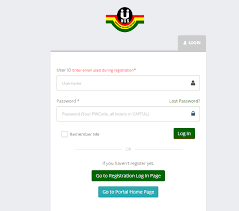
- Visit the official portal: www.gogpayslip.com
- Enter your Staff ID and Password
- Click Login to access your dashboard
- Choose month/year to view or download your payslip
👉 view e-payslips on mobile phone easily (full guide)
Note: First-time users must register through their department.
📝 How to Register for GOG E-Payslip
To create your account:
- Contact your Head of Department or E-SPV Coordinator
- Submit your Staff ID and personal details
- Receive your Registration Code and login details
- Visit www.gogpayslip.com
- Complete registration and change your password
🌍 Related Payroll Systems (Global)
👉 myEpayWindow Login | Access Your Employee Dashboard Guide
👉 e Payslip Portal Zambia | Login & Download Your Payslip Online
👉 iris my epaywindow explained for employees and employers
👉 zambia e-payslip portal login and download guide
🔄 How to Reset Your Password
If you forget your password:
- Go to the login page
- Click Forgot Password
- Enter Staff ID and registered contact
- Follow reset instructions
❓ How Do I Register for an E-Payslip Account in Ghana?
Follow this secure process:
- Get Registration Code
- Provided by your Head of Department or ESPV unit
- Visit Official Portal
- Go to gogpayslip.com
- Start Registration
- Click “Register for E-Payslip”
- Fill Required Details
- Employee Number
- Password
- Registration Code
- Email & Phone
- Activate Account
- Enter code sent to your phone/email
- Login and Access Payslips
📞 CAGD Contact Details
Head Office
- Address: Ministries, Accra
- Postal: P.O. Box M79, Accra
- Phone: +233 (0) 302 983507
- Email: info@cagd.gov.gh
Regional Offices
- Greater Accra: 0302-228721 Ext. 2117
- Ashanti: 03220-22903
- Northern: 03720-22604
- Western: 03120-46007
- Eastern: 03420-22571
- Volta: 03620-26271
❓ Frequently Asked Questions (FAQs)
1. How do I log in to my GOG E-Payslip account?
Visit gogpayslip.com, enter your Staff ID and password, then click login to access your dashboard.
2. Can I check my payslip on my phone?
Yes. The portal is mobile-friendly, so you can view, download, and print payslips directly on your smartphone.
👉 check payslip on phone without stress (easy method)
3. What should I do if I forget my password?
Click Forgot Password on the login page and follow the reset steps using your registered phone or email.
4. Why can’t I register by myself?
Registration requires a unique code from your Head of Department or ESPV coordinator for security reasons.
5. Is the GOG E-Payslip Portal safe?
Yes. It is an official government system designed with secure login and data protection features.
6. Can I print my payslip for official use?
Yes. You can download and print your payslip anytime for loans, visa applications, or documentation.
7. How far back can I access my payslips?
You can access previous months and years, depending on your employment history in the system.
📌 Final Tip
The GOG E-Payslip Portal makes salary access simple and efficient. Always keep your login details secure and ensure your personal information is updated regularly.
For safety, only use the official portal and avoid unofficial links.