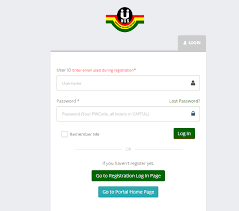
The NSA portal for teachers and nurses has been updated for the 2026 service year. This page explains the current enrollment status and what applicants should confirm.
Latest Update (2026):
The NSA portal for teachers and nurses is active for the 2026 service year. Eligible applicants should verify personal details before completing enrollment.
The NSA Portal for Teachers & Nurses is now open for enrollment, allowing qualified educators and health professionals in Ghana to register for various National Service and professional service opportunities. This digital portal streamlines enrollment, verification, and service placement — especially for teachers and nurses preparing for national service or employment.
What Is the NSA Portal?
The NSA (National Service Authority) Portal is an online system used by the Government of Ghana to:
- Register eligible teachers and nurses
- Capture personal and professional data
- Assign national service placements
- Track service completion status
- Teachers and nurses must enroll to be considered for National Service postings.
Who Should Use the NSA Portal?
The portal is for:
- Newly graduated teachers
- Nurses completing professional training
- Health workers registered with recognized bodies
- Applicants preparing for national service placement
NSA Portal for Teachers & Nurses Enrollment now Live — What It Means
The NSA Portal being live means:
- Teachers and nurses can now create accounts
- Upload credentials and documents
- Submit service preferences
- Track application and posting status online
This replaces manual or paper-based registration.
How to Register on the NSA Portal (Step-by-Step)
Step 1: Visit the Official Portal
Go to the official NSA Portal login/enrollment page: https://posting.gnsa.gov.gh/
Step 2: Create an Account
- Use a valid email address
- Enter your full name
- Set a secure password
Step 3: Complete Personal Details
Provide accurate:
- Date of birth
- Contact information
- Nationality
- Address
Step 4: Upload Professional Credentials
You may need:
- Teacher training certificates
- Nursing certificates
- Professional license or registration
- National Service ID (if available)
Your CV should follow professional standards:
How to write a CV for government jobs in Ghana
Step 5: Submit and Verify
After submission:
- Verify your email
- Await confirmation from NSA
- Check status in your portal dashboard
Required Documents for Enrollment
Ensure you have:
- Valid Ghana Card
- National Service ID (if registered)
- Professional certificates (Nursing / Teaching)
- Passport-style photo (if required)
How to Login to the NSA Portal
Once registered:
- Visit the NSA login page: https://posting.gnsa.gov.gh/
- Enter your email and password
- Access your dashboard
- Check:
- Enrollment status
- Posting updates
- Service assignment
Common NSA Portal Issues & Solutions
Issue: “Login failed”
✔ Solution: Reset your password
Issue: “Uploads not successful”
✔ Solution: Check file size/format
Issue: “Status not updated”
✔ Solution: Wait for portal processing time; check back daily
What Happens After Enrollment
Once your details are validated by NSA:
- You may receive posting notifications
- You can track deployment
- You may be contacted for orientation
Related:
GES posting & appointment letter
Tips for Teachers & Nurses
✔ Use an official email
✔ Upload clear scanned documents
✔ Complete all mandatory fields
✔ Update profile if information changes
Related Pages
The NSA Portal for Teachers & Nurses enrollment makes professional registration simpler and more transparent. Always use the official portal and protect your login credentials.
Bookmark ghresults.com for updates on postings, salary checks, and service requirements.