
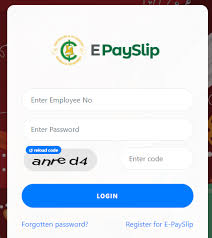
The GoGPayslip portal is an official online platform introduced by the Controller and Accountant General’s Department (CAGD) of Ghana. It allows government workers to securely access, download, and print their salary slips online without visiting their offices. If you’re a government employee, knowing how to check your e-payslip online is essential for tracking salary details, deductions, and allowances.
Why Use the GoGPayslip Portal?
The GoGPayslip system was created to simplify salary management for government employees in Ghana. Instead of relying on paper payslips, staff can now check salary details anytime, anywhere.
Key Features:
- View monthly salary slips instantly
- Download and print payslips for personal or official use
- Track deductions and allowances with transparency
- Secure login system for employee privacy
- 24/7 access from any device with internet connection
How to check your Gogpayslip e payslip online
Follow these steps to log in and view your payslip:
- Visit the official website: www.gogpayslip.com
- Enter your Employee Number / Staff ID
- Provide your Password
- Click Login to access your account
- Go to the Payslip section to view your current or past salary slips
- You can then download or print your payslip for records
Note: First-time users need to register on the portal before accessing payslips.
How to Reset GoGPayslip Password
If you forget your password:
- Go to the login page
- Click Forgot Password
- Enter your employee number and registered phone/email
- Follow the reset instructions to create a new password
Can I check my payslip on my phone?
Yes. The GoGPayslip portal is mobile-friendly, so you can log in and access payslips from your smartphone.
How do I download my e-payslip?
After logging in, go to the Payslip section, select the month, and click Download. You can also print directly.
Who do I contact if I cannot log in?
Reach out to your HR department, validator, or the Controller and Accountant General’s Department (CAGD) for assistance.
The Controller and Accountant-General’s Department (CAGD) in Ghana can be reached through their head office and regional offices.
Head Office Contact
- Physical Address: Ministries, Accra, GA-110-7376
- Postal Address: P.O. Box M79, Ministries, Accra, Ghana
- Phone: +233 (0) 302983507
- Email: info@cagd.gov.gh
Regional Office Contacts
The CAGD also has offices in each region of Ghana. For more localized issues, it’s often best to contact the relevant regional office. Here are a few examples:
- Greater Accra Region: 0302-228721 Ext. 2117
- Ashanti Region: 03220-22903
- Northern Region: 03720-22604
- Western Region: 03120-46007
- Eastern Region: 03420-22571
- Volta Region: 03620-26271
For a complete list of regional contacts, it’s advisable to check the official CAGD website.
Thank you for visiting GHResults.com — we wish you all the best on your journey ahead, and we look forward to welcoming you back soon!